How to Plan a Month's Worth of Content in One Day
Table of Contents
- Introduction
- Why Batch Content Planning Works
- Preparing for Your Batch Planning Day
- Step-by-Step Process to Plan a Month's Worth of Content in One Day
- Integrating IGdm Pro to Streamline Your Workflow
- Additional Tips to Enhance Your Content Planning Strategy
- Conclusion
Introduction
Feeling overwhelmed by the relentless need to produce fresh social media content? You're not alone. Many business owners and creators find themselves caught up in the daily scramble of content creation, posting, and engagement. Imagine if you could plan a month's worth of content in just one day. This isn't a far-fetched fantasy; it's an achievable strategy that not only helps in saving time but also ensures consistency and quality in your messaging.
In this guide, you'll learn how to plan a month's worth of content in one day. We'll walk through actionable tips, practical examples, and a detailed step-by-step process. Plus, we'll sprinkle in some savvy ways to use automation tools such as IGdm Pro for automating your Instagram Direct Messaging and scheduling responses. Let's dive in!
Why Batch Content Planning Works
Batch planning is all about creating structure and freeing up time for creative tasks and strategic thinking. Instead of getting bogged down daily with idea generation and execution, you dedicate one focused day to map out your entire month. Here are some reasons why you should consider this approach:
- Consistency: Maintaining a regular posting schedule builds trust with your audience.
- Efficiency: By grouping similar tasks together, you reduce transition time and can focus more deeply on each step.
- Quality: With ample time to plan, research, and refine your content, you create more thoughtful and engaging posts.
- Stress Reduction: Knowing that your content is planned frees your mental bandwidth for other aspects of your business.
Batch planning isn't just a time-saver; it's a way to leverage your creativity better. When your posts are aligned with a clear strategy and goal, every piece contributes to a cohesive narrative that resonates with your followers.
Preparing for Your Batch Planning Day
Before you jump into planning a month's worth of content, some preparation is necessary. This preparation sets the stage for a productive and creative day.
Set Your Goals
Every successful content plan starts with clear objectives. Ask yourself:
- What is my primary goal for the month?
- Do I want to increase engagement, drive more traffic, or boost conversions?
For instance, you may set a goal to generate more leads or to promote a specific product launch. Clear monthly goals inform your content themes and topics, ensuring every post serves a purpose.
Gathering Your Inspiration & Tools
Collect all the resources that inspire you. This might be mood boards, competitor analyses, past successful posts, or trending topics. An organized workspace—be it digital or physical—will help you harness inspiration without distractions.
Consider using a versatile content calendar tool or even a good old-fashioned notebook. Also, gather reliable tools such as:
- Content research software like BuzzSumo or Google Trends
- A robust design tool, such as Canva for graphics
- Automation tools like IGdm Pro to handle Instagram engagement
These preparations set you up for a day of uninterrupted creative flow.
Step-by-Step Process to Plan a Month's Worth of Content in One Day
Below is a detailed process to guide you through batch planning your content in one day. This method borrows elements from successful strategies outlined by experts but offers fresh angles and integrations for a comprehensive approach.
Step 1: Brainstorm Content Ideas
Set aside a dedicated one-hour session for brainstorming.
- Use Timers and Prompts: Challenge yourself with a timer set for short bursts, say 25 minutes. This limits overthinking and increases spontaneous idea generation.
- Mind Mapping: Begin with your core goal and branch out related topics. Use paper, a whiteboard, or digital tools like MindMeister.
- Review Analytics: Check your recent post performance to see what content resonates with your audience. This can provide insight into themes that deserve more exploration.
Write down as many potential post ideas as you can. Don't worry about perfection during this stage—quantity matters as much as quality.
Step 2: Create a Content Calendar
Transform your brainstorming output into a structured calendar.
- Template Setup: Use a dedicated spreadsheet, a planning tool, or even a digital calendar. Break the month into days and assign a slot for each post
- Content Themes: Allocate specific themes to different days of the week. For example, Mondays can be motivational, Wednesdays educational, and Fridays fun-filled.
- Integration Tips: If you use a tool like IGdm Pro, you can plan your Instagram messages and interactions around these themes. By scheduling messages and bulk messaging potential leads or engaged audiences, you ensure your social media strategy complements your content plan.
This stage converts raw ideas into actionable daily posts, making it much easier to execute later.
Step 3: Write and Repurpose Your Core Content
Now that you have a calendar, it's time to create your central piece of content.
-
Write a Foundational Blog or Long-Form Post: Choose one strong piece that encapsulates your main theme for the month. This piece should serve as a touchstone for subsequent posts. For example, if your focus is on digital marketing tips, create an in-depth guide that you can later distill into bite-sized posts.
-
Repurpose Content: Once your foundational content is ready, repurpose it into smaller segments. Here are a few ways to do so:
- Extract key quotes or statistics for social media posts.
- Create short tips or carousel posts that expand on individual points.
- Summarize your post into an engaging newsletter blast to share with your email list.
-
Editing and Polishing: Spend about two hours focused purely on writing and editing. This ensures your content is consistent with your brand's voice and free of errors. A clean, well-written piece can significantly boost your brand's credibility.
Step 4: Visuals and Graphics Creation
Visual content is crucial in capturing your audience's attention. Dedicate a few hours to planning and designing visuals that align with your posts.
-
Mood Boards: Create mood boards or templates that resonate with your brand's aesthetics. Tools like Canva offer versatile templates that can be quickly customized.
-
Theme Consistency: Ensure that your visuals are not just appealing but also maintain a consistent color palette and style. This will help in reinforcing your brand identity.
-
Example: If you're planning an Instagram series on productivity hacks, design a set of images that use your brand colors and include clear, concise text overlays highlighting each tip.
Step 5: Scheduling and Automation
Here comes the part where modern technology plays a starring role. Use scheduling tools to automate the posting process, ensuring your content releases on time.
-
Social Media Schedulers: Tools such as Later, Buffer, or Hootsuite help streamline the scheduling process. Simply upload your pre-planned posts and let the scheduler do the heavy lifting.
-
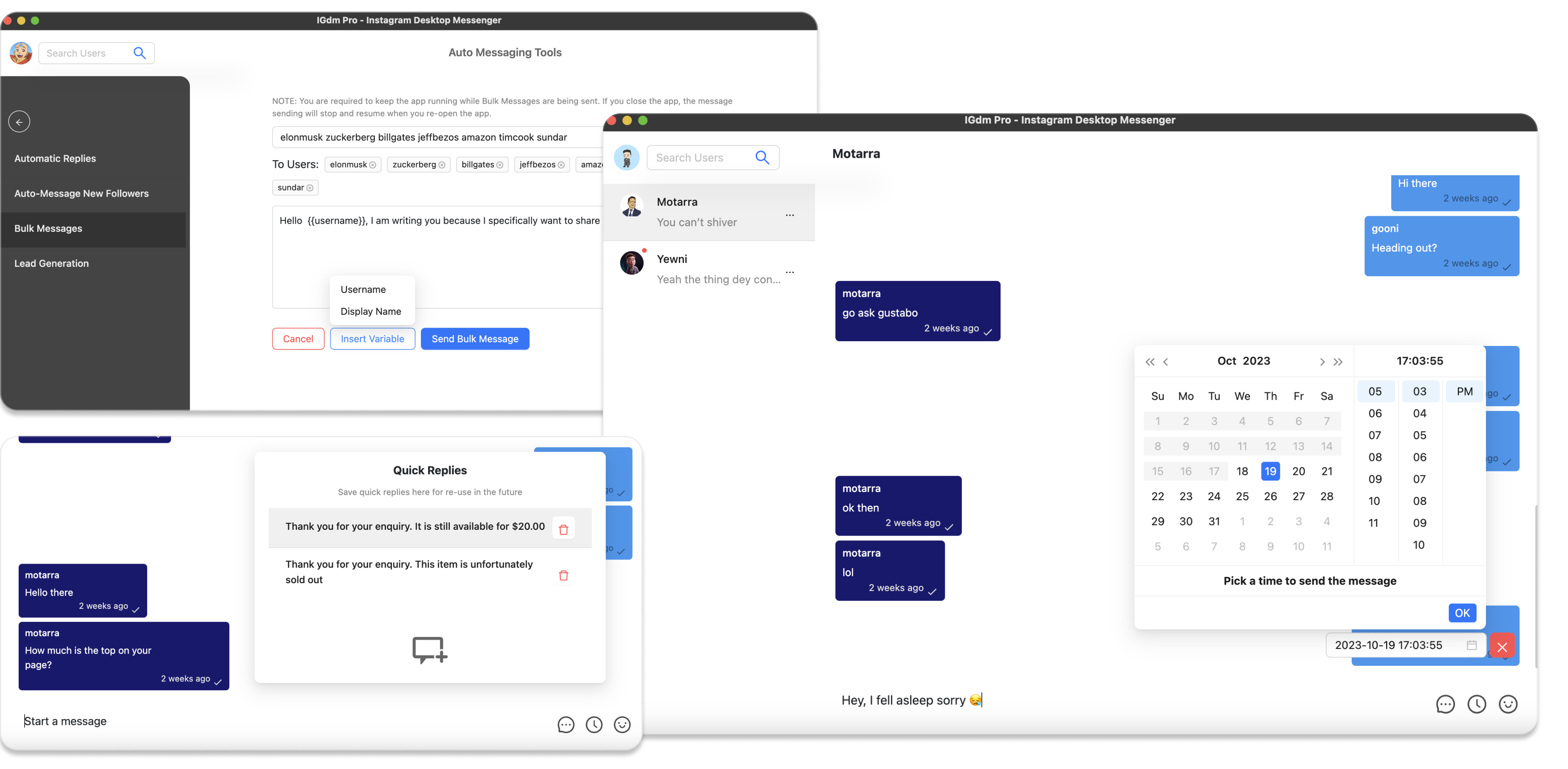
Utilizing IGdm Pro: If Instagram Direct Messaging is part of your engagement strategy, consider using IGdm Pro. With features like Scheduled Messages and Bulk Messaging, you can automate responses and engage with your audience without manual intervention. This is especially handy for sending timely follow-ups or automated greetings to new followers, ensuring every interaction is handled professionally.
-
Consistency Checklist: Before finalizing the schedule, review your entire content calendar to ensure that topics, visuals, and call-to-actions are balanced across the month.
By planning ahead and integrating automation, you minimize the day-to-day burden of posting and interaction, allowing you more time to focus on strategic business growth.
Integrating IGdm Pro to Streamline Your Workflow
When planning a month's worth of content in one day, you want every tool at your disposal to work seamlessly. One such tool is IGdm Pro. Here's how it can enhance your content planning process:
-
Automated Replies: Ensure that your Instagram messages receive timely responses even when you're busy with other tasks. This helps maintain engagement without you being actively present all the time.
-
Scheduled Messages: Align your Instagram Direct Messages with your content schedule. For example, use scheduled messaging to send reminders about new posts or promote your latest blog piece automatically.
-
Bulk Messaging: If you're planning a campaign or want to share an update with many followers simultaneously, bulk messaging can be a game changer. It ensures personalized communication at scale.
-
Labelled Conversations: Keep your chats organized by labeling them. This feature is especially useful if you're managing multiple campaigns or collaborations.
Using IGdm Pro in tandem with your content planning strategy not only saves time but also ensures that your audience engagement remains top-notch. This integration of streamlined processes leads to a more efficient social media management system overall.
Additional Tips to Enhance Your Content Planning Strategy
To elevate your batch planning process further, consider the following additional strategies:
-
Review Performance Metrics: Regularly check insights and analytics from previous posts. Platforms like Instagram and Facebook offer detailed engagement data that can inform better content choices for the future.
-
Flexibility: While it's important to stick to your planned schedule, be flexible enough to adjust if current events or trends demand it. A content living document is always better than a rigid plan.
-
Collaboration: If you work with a team, share the content calendar in advance. This fosters a collaborative environment where everyone can pitch ideas or spot potential blind spots.
-
Content Repository: Keep a repository (a digital folder or cloud storage solution) where you store all your graphics, captions, and ideas. This organized approach makes future batch planning sessions much easier.
-
Use Deadlines: Realistic deadlines for each phase of content creation (brainstorming, writing, designing, and scheduling) keep you accountable and ensure that no part of the process falls behind.
-
Experiment: Don't be afraid to experiment with different types of content—reels, stories, carousels, and long-form blogs. Understanding which formats work best for your audience can improve your overall engagement and conversion.
-
Engage with Your Audience: After posting, make sure you have a plan for engagement. This might include responding to comments, interacting via polls on Stories, or using IGdm Pro's automated replies to maintain communication.
These extra steps ensure that your batch planning day is not just about filling a content calendar but also about creating a sustainable, adaptive content strategy.
Conclusion
Planning a month's worth of content in one day might sound intimidating, but with a smart strategy and the right tools, it can become a rewarding part of your business routine. By setting clear goals, brainstorming content ideas, meticulously organizing your content calendar, and leveraging automation tools like IGdm Pro, you can streamline your social media branding while reducing daily stress.
Remember, consistency and quality are key to building trust with your audience. When every piece of content serves a purpose and is aligned with your business goals, your brand not only attracts attention but also builds credibility. So, mark your calendars, gather your ideas, and dedicate one day to transform your content strategy!
Keep experimenting, learning from your analytics, and adjusting your strategy to stay relevant and engaging. Happy planning, and here's to a month filled with creativity, efficiency, and effective communication!