How to Get More Replies to Your Instagram Cold DMs
Cold Instagram DMs fail for a simple reason: the recipient does not know you, your message looks like a blast, and Instagram often buries first-contact DMs where people never see them.
You do not need a longer script. You need a better first contact.
The three tricks below each help a little on their own. Stacked in a tool like IGdm Pro, they make outreach feel more familiar, more relevant, and less like spam. Each section covers why it works, then how to turn it on in a bulk messaging campaign.
Table of Contents
- Trick 1: Create familiarity before the ask
- Trick 2: Stop sounding like a template
- Trick 3: Land where they actually look
- How the three tricks work together
- Quick checklist
Trick 1: Follow before you DM
Why this works
A cold DM from a stranger with zero prior signal is easy to ignore. A follow creates a light social touch before the message arrives:
- The person may see you in new follower notifications or requests.
- Your account looks less random when they open the DM and notice you already followed them.
- For many users, a follow + thoughtful message feels closer to normal networking than a one-sided blast.
It is not a guarantee. It is a context play: you are no longer a name that appeared out of nowhere with a pitch.
How to do it in IGdm Pro
- Open Auto Messaging Tools and start (or edit) a Bulk Messages campaign.
- Compose your base message and select recipients as usual.
- Open the campaign settings list below the message editor.
- Expand Follow User Before Messaging Them and turn it on.
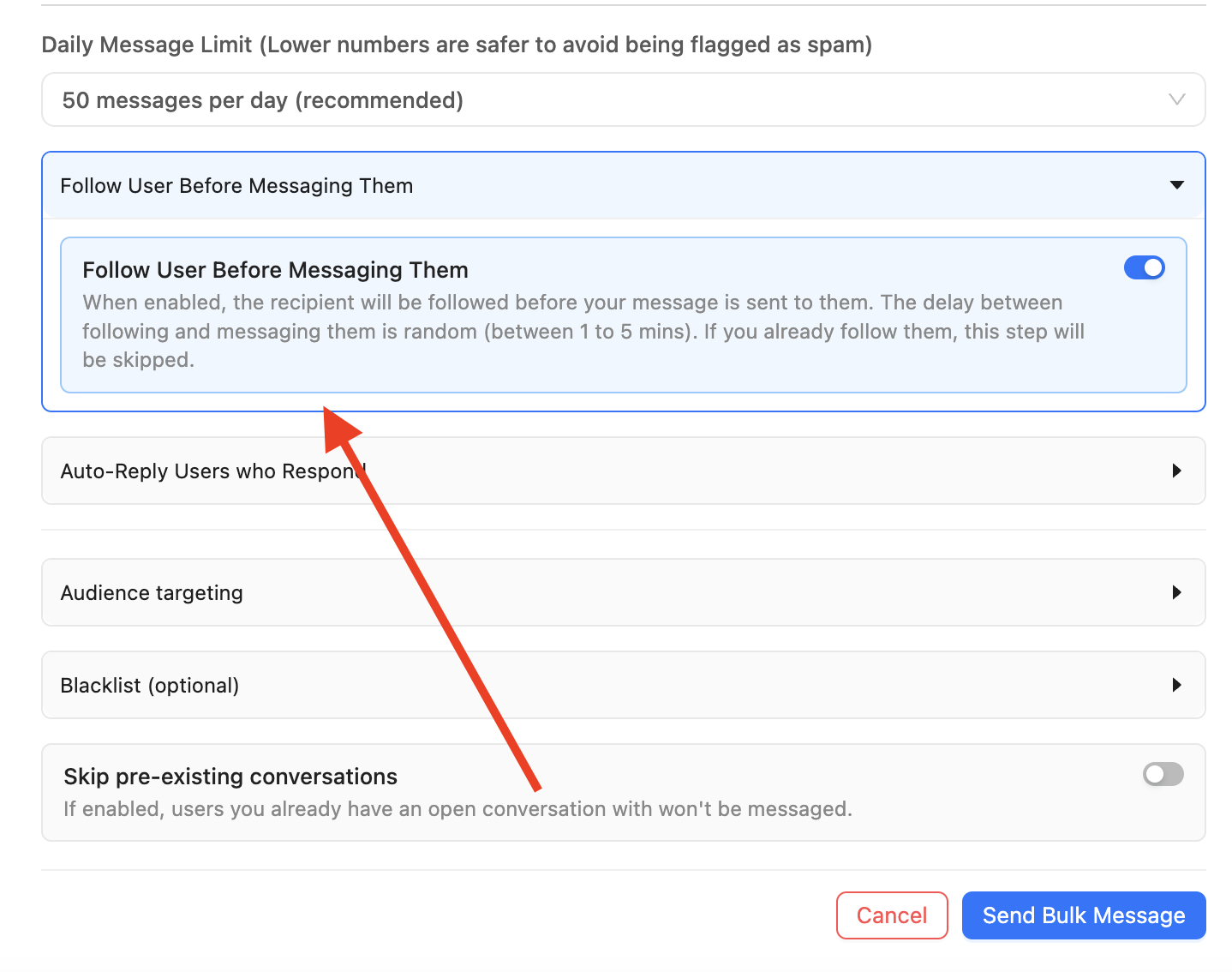
When enabled, IGdm Pro follows each recipient before sending their DM, so the follow and the message stay tied to the same outreach step.
Tip: Keep daily volume modest (for example 50 messages per day) while you test. Following plus messaging still counts as activity, so pacing matters. See How to Automate Instagram Outreach Without Getting Banned for safer send habits.
Trick 2: Personalisation with AI
Why this works
First-name merge tags help, but everyone can spot Hi {{firstname}}, want free coaching? on a bad day. Real personalization references something about them: a bio line, a niche, a recent caption, a creator category.
That matters because:
- People reply faster when the opener proves you looked at their profile.
- Unique wording per recipient reduces the “identical spam template” pattern Instagram and users both dislike.
- You can keep a clear offer while the middle of the message adapts to each person.
How to do it in IGdm Pro
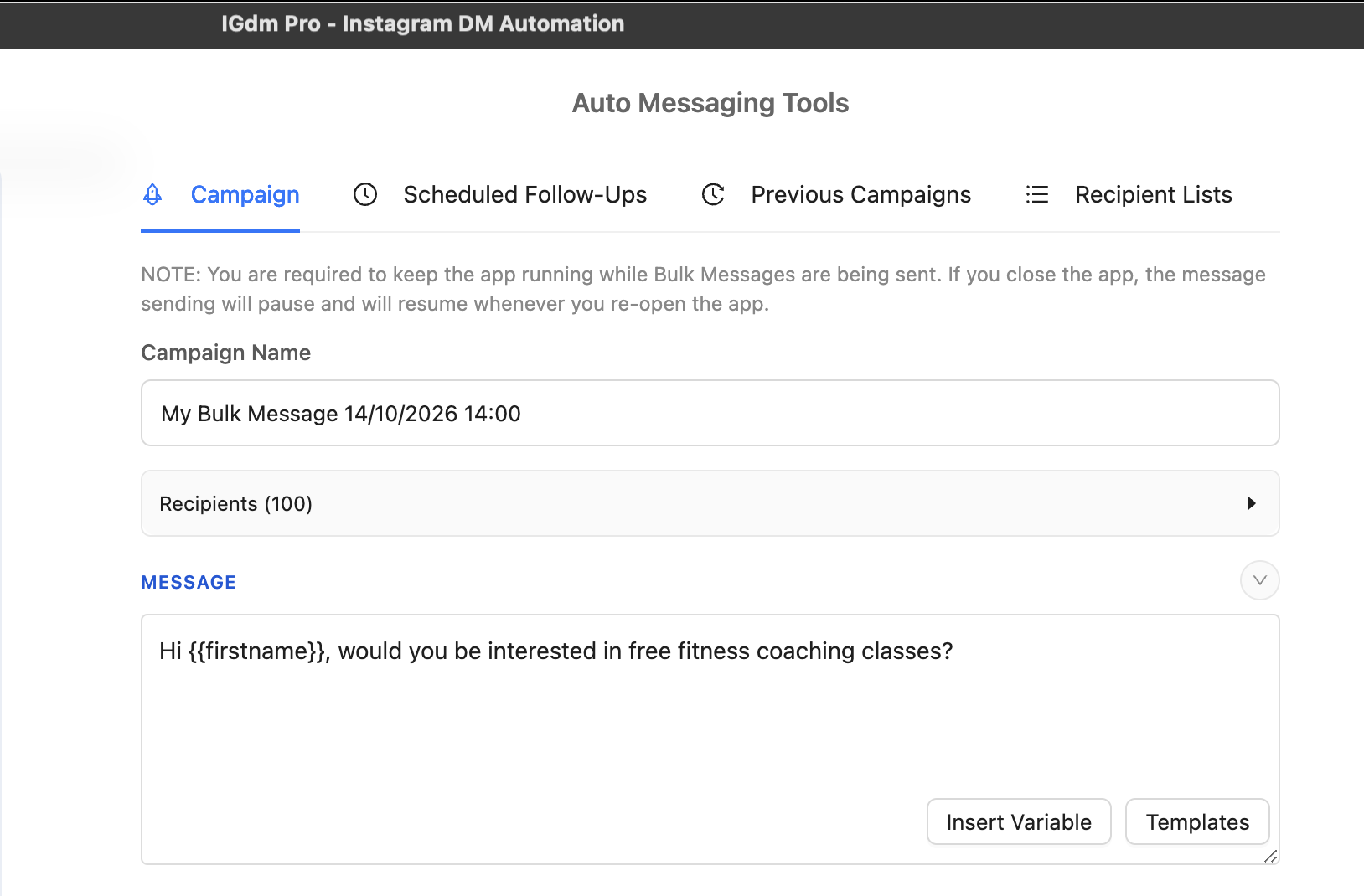
Start with a clear base message. In the Campaign tab, write something short and specific. Variables like {{firstname}} still work.
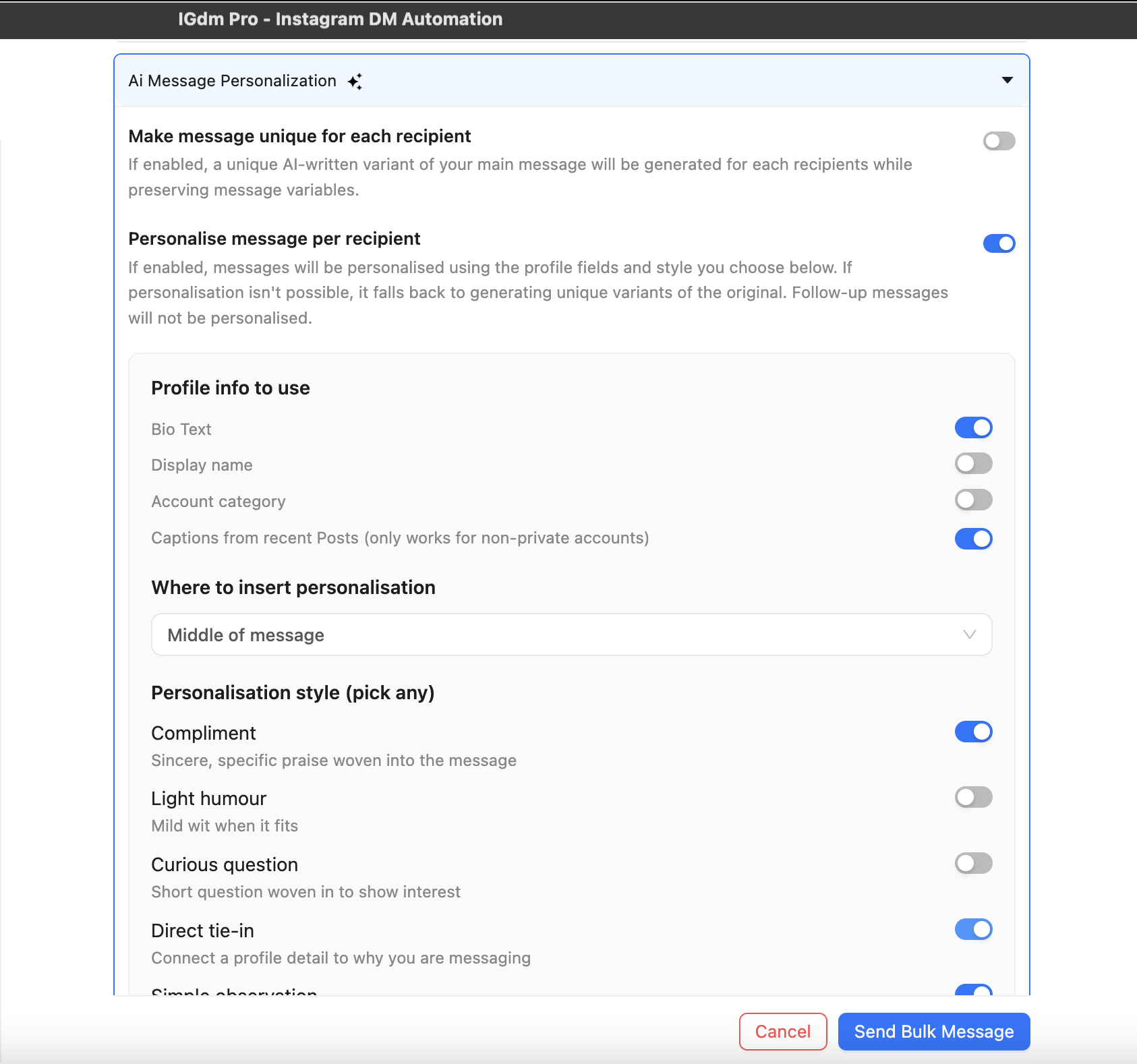
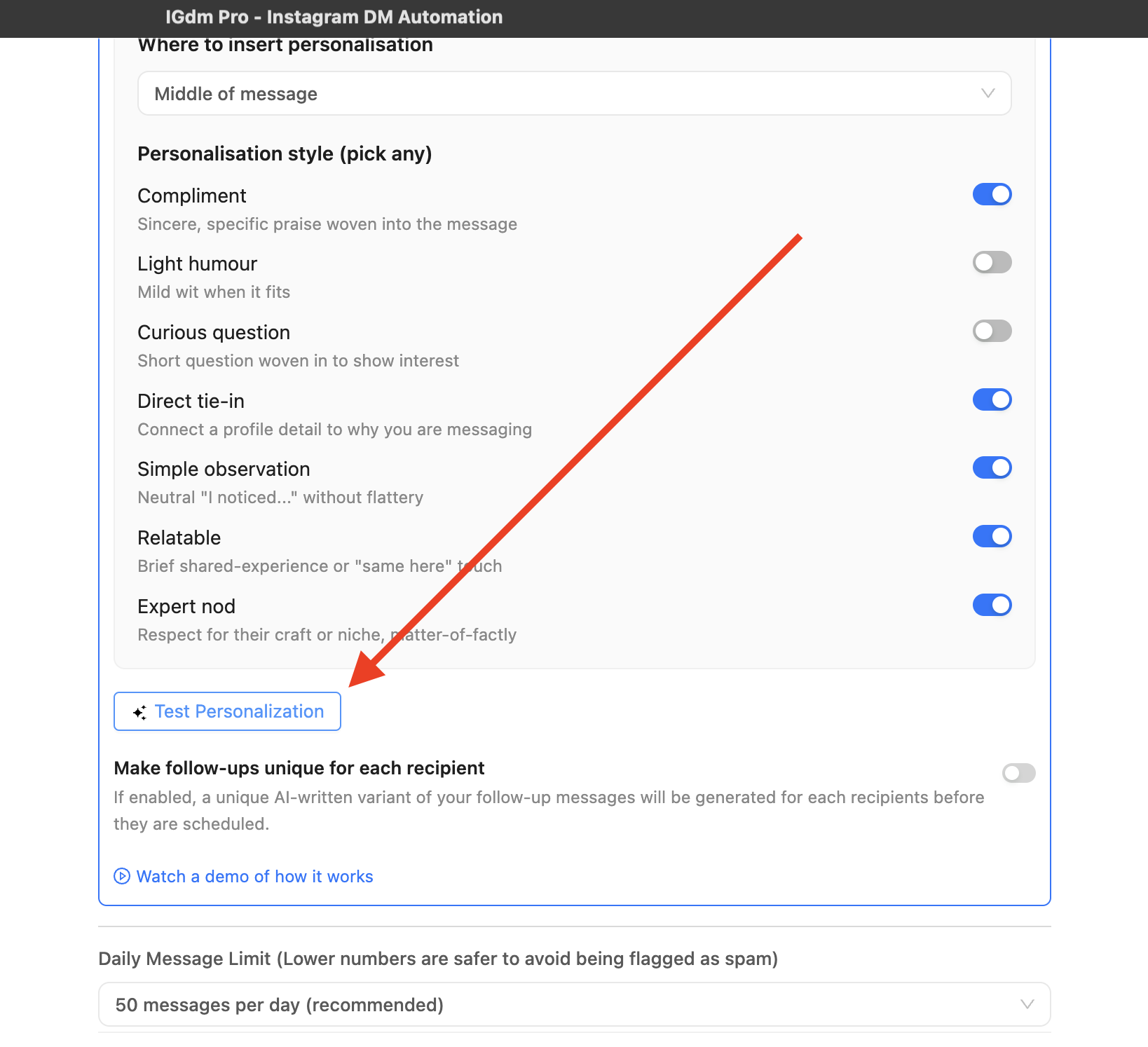
Next, open Ai Message Personalization in the campaign settings.
- Turn on Personalise message per recipient.
- Choose which profile signals the AI can use (for example Bio Text and Captions from recent Posts).
- Pick Where to insert personalisation (Middle of message is a strong default).
- Enable personalisation styles that fit your tone, such as Compliment, Direct tie-in, and Simple observation.
Before you send to the full list, click Test Personalization. That preview is how you catch weird wording early.
The preview shows the profile context used and the personalized message. In the example below, the base fitness offer stays intact, while the AI weaves in a detail from the recipient’s bio (“sharing daily inspirations”).
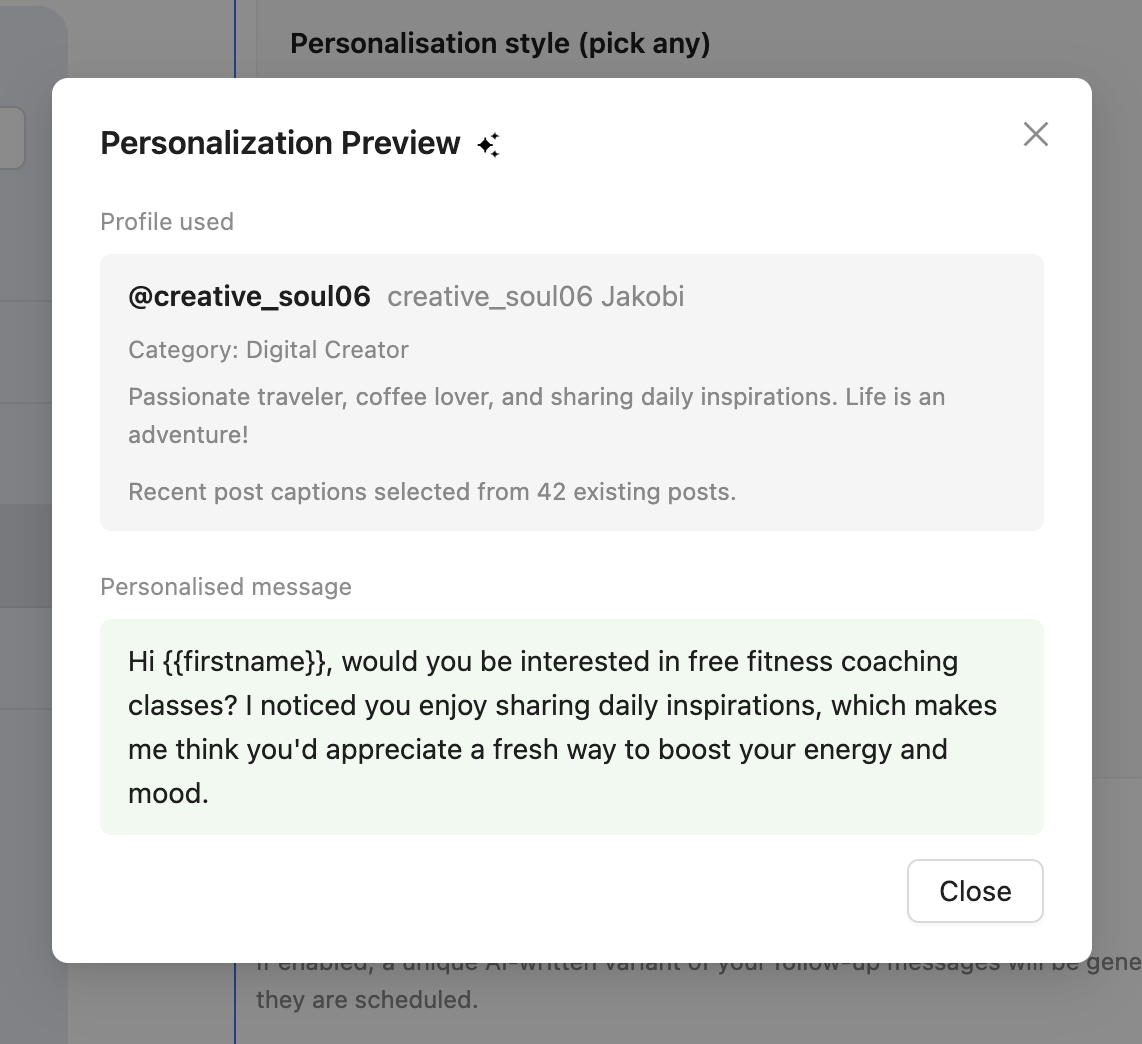
That is the difference between a merge-tag blast and a message that feels hand-written at scale.
Trick 3: Send as a story reply
Why this works
New DMs from non-followers often land in Message requests or get treated like low-priority spam. Story replies behave more like a normal conversation touch:
- They attach to something the person just posted (their story).
- They are less likely to sit unnoticed in a request folder.
- The thread already has a social cue (“you saw my story”) instead of a cold open.
If the recipient has no active story, you still need a fallback. IGdm Pro handles that: it sends as a story reply when a story exists, and as a normal DM when it does not. You keep the upside without breaking the campaign for people with empty story rings.
How to do it in IGdm Pro
In the same campaign settings panel:
- Expand Send message as story reply.
- Turn the toggle on.
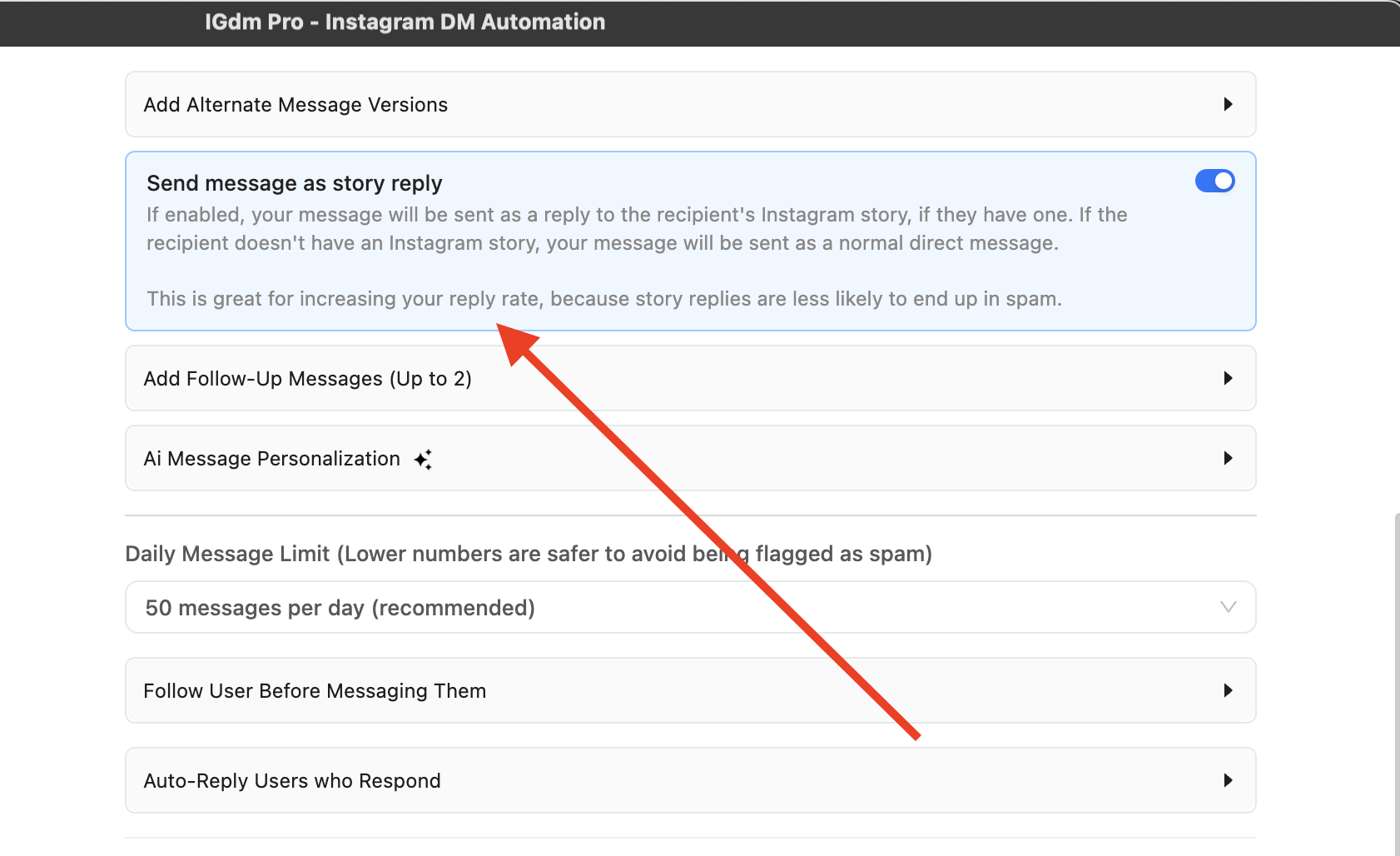
That toggle lives in the same campaign settings list as the other two tricks. Turn all three on when you want the full reply-rate stack on one campaign.
How the three tricks work together
Think of the stack as three layers of the same first impression:
| Layer | What the recipient experiences |
|---|---|
| Follow first | “This person is not a random one-tap pitch.” |
| AI personalization | “This message noticed something about me.” |
| Story reply | “This showed up in a normal reply path, not only as a cold request.” |
That combination is stronger than any single toggle. A personalized story reply after a follow is closer to how humans network on Instagram than a generic midnight blast to 200 strangers.
Practical order inside IGdm Pro:
- Write the base message.
- Configure AI Message Personalization and run Test Personalization.
- Enable Follow User Before Messaging Them.
- Enable Send message as story reply.
- Keep a sensible Daily Message Limit and start the campaign with the app running.
Conclusion
More replies rarely come from shouting louder. They come from making cold outreach feel warmer: a follow for familiarity, AI personalization for relevance, and story replies for better delivery. IGdm Pro puts those three controls in one bulk campaign flow so you can run them together instead of juggling workarounds.
Ready to try the stack on your next list? Start with a 10-day free trial of IGdm Pro.